Showing posts with label Coding. Show all posts

Friday, July 10, 2015

INTERFACING OF ATmega16 TO LCD AND SENDING DATA TO LCD VIA USART


Hi Guys Today we see how to transfer data from USART to LCD in ATmega16

Interfacing of LCD to ATmega16 and sending data to LCD from USART PORT

To design this Project we need to initialize USART and LCD

Then we must fetch data from TXD Pin send to LCD display.

To Enable USART:

In this we are using F_CPU = 8MHz; for the USART communication we should initialize proper Baud Rate.

To Enable USART:
    1.) Baud Rate should be set.
    2.) Initialize Control register for 8bit data transfer

We take Baud Rate as 9600


For F_cpu = 8Mhz and Baud Rate 9600 we should enter the value of UBRR value as shown in Table above i.e.: 51 in decimal so in we must enter 33 Hex Value.
U2X = 0 means asynchronous and U2X = 1 means synchronous.
We are using asynchronous transmission.
There are 3 control register and 1 data register for USART

Control Register:

1.) UCSRA
2.) UCSRB
3.) UCSRC

Data Register:

1.) UDR

Control Register:
        1.) UCSRB & UCSRC:

In this Register we should enable TXEN and RXEN bit by setting it 1(high).

And there is bit UCSZ2 bit with used to set whether it’s a 8 bit transmission or 9 bit transmission.

UCSZ2 combine with two other bit UCSZ1 and UCSZ0 in Register UCSRC are used to set it the Table show the setting.
We are using the Character Size as 8 bit, so UCSZ2-UCSZ0 = 011

In UCSRC Register there is bit URSEL which is used to access the UBRR Register and UCSRC Register if Set 0 means UBRR (initially its UBRR Register) and when set 1 we can use UCSRC Register. Thus to set 8bit transmission we should 1st set URSEL bit.


2.) UCSRA:

   U2X = 0 because we are using Asynchronous mode.(Initially it is 0)

3.) UDR:

This is a Data register for USART it convert Serial data (8 bit) into Parallel (8 bit) data and vice versa.
Is used to for transmitting and receiving the data from TXD and RXD Pin.


To Enable LCD:

1.)           We are using 4-bit LCD.

       To interface LCD in 4-bit mode we have seen in previous topic.
     For more details in coding LCD please refer Videos

In this program we receive each data from the rxd pin and send it to LCD using microcontroller.

Each time a data is send via serial port it will be displayed in LCD.


Thursday, June 26, 2014

INTERFACING OF PIC18F4550 TO LCD IN 4-BIT MODE

INTERFACING OF PIC18F4550 TO LCD IN 4-BIT MODE

LCD Description:

LCD display has 3 control pin:
       
       1.)  Register Select Pin (rs)
       2.) Read/Write Pin (rw)
       3.) Enable Pin (en)

Register Select Pin used for selecting the Register of LCD i.e.
Command Register or Data Register.
rs = 0; Command Register.
rs = 1; Data Register.

Read /Write Pin used for selecting Read from or Write to LCD i.e.
rw = 0; Write mode.
rw = 1; Read mode.

Enable Pin used for Latching Data into LCD data Register.
When Write Data to LCD en must go High to Low.
And to Read Data from LCD en must go Low to High.


LCD has 8-bit Data Pin:

We are using 4-bit Mode, so we are using only high 4-bit.
i.e. (D7-D4).


Thank You.
Plz Do Share and Subscribe the Video.
Code: Click For Code
For Video on Above Program: Click For Video

Wednesday, April 16, 2014

INTERFACING OF 4x4 KEYPAD TO MICROCONTROLLER


INTERFACING OF 4x4 KEYPAD TO MICROCONTROLLER
  • Interfacing of microcontroller to 4x4 Keypad is very simple.
  • The Simple logic behind this is just scan all the key in the matrix.
  • Let assume 4 line are output and 4 lines are input.
  • Columns are input.
  • Row are output.


C1
C2
C3
C4
R1
0
1
2
3
R2
4
5
6
7
R3
8
9
A
B
R4
C
D
E
F


          C = Columns
          R = Rows


Case 0:

C1
C2
C3
C4
R1
0
1
1
1
R2
1
1
1
1
R3
1
1
1
1
R4
1
1
1
1
  •  When Row and Column are shorted then it is accepted as Key Pressed Now C1 & R1 = 0.
  • That means “0”. 


Case 15:

C1
C2
C3
C4
R1
0
1
1
1
R2
1
1
1
1
R3
1
1
1
1
R4
1
1
1
0
  •  When Row and Column are shorted then it is accepted as Key Pressed Now C4 & R4 = 0.
  • That means “F”.


Similarly all other Keys are checked. While pressed we must wait to 20msec i.e. Debounce effect of switch button or key. If Still key is pressed then it’s assumed as key pressed and Equivalent value is displayed.


Thank you and for any queries do comment .....

For Program download it below link:
For LCD : Click for Code
For Keyboard : Click for code
For Videos on Above Program : Click on the Link


Monday, March 3, 2014

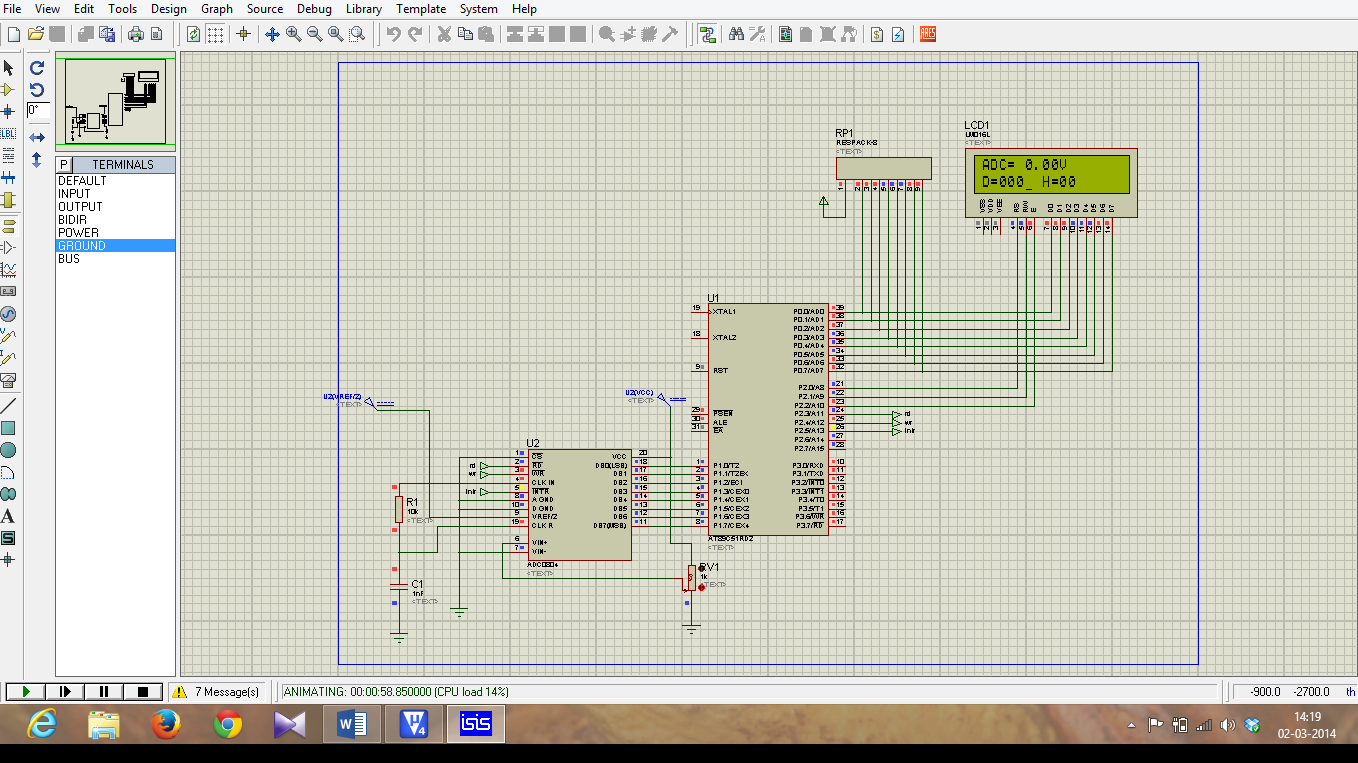
INTERFACING OF MICRO-CONTROLLER 8051 TO ADC (ADC 0804)

 INTERFACING OF MICRO-CONTROLLER 8051 TO ADC (ADC 0804)

Micro-controller 8051 does not has in-built ADC. So, we are using external ADC 0804. It is an 8-bit ADC so, resolution = 8-bit.

ADC 0804 Pin Details:


DB7 - DB0 – Are 8 Data Pin which hold Converted Digital data.

CS - It is an Active low signal usually we can ground it, or use a pin from microcontroller to control it by passing high to low pulse in the pin.

RD – It is an Active low signal it use to read data from ADC0804 Data line (DB7-DB0).

WR - It is an Active low signal. When low to high signal is passed in that pin the adc conversion start.

INTR - It is an Active low signal. It is used to Check for End of Conversion.

Vref/2 – It is the References voltage is given to ADC for Step sizes Calculation of conversion.

AGND – Analog Ground.


DGND – Digital Ground.

Important Note:

Resolution of this ADC is 8bit, so that means the Steps ranges from (0-255)

Formula:
            Step sizes = Vref/(2n -1);              n = 8(Resolution of ADC).
                            = Vref/(256 - 1);
                                   =  Vref/255;  


  • To convert and display the data into LCD we use a formula to convert it to ascii.

                                      if data = 125  
     for unit place data the formula is

  •         (data%10) = 5 => now or with 30h we get ascii value i.e.( 5|0x30 ) = 35

                               35 in ascii means 5 numeric.

     for tenth place data the formula is

  •          ((data/10)%10) = 2 => now or with 30h we get ascii value i.e.( 2|0x30 ) = 32

                               32 in ascii means 2 numeric.

     for send data the formula is

  •        ((data/100)%10) = 1 => now or with 30h we get ascii value i.e.( 1|0x30 ) = 31

                               31 in ascii means 1 numeric.

  • To convert the data into LCD in Hex format using lookup table
  •  first Mask the low bits using 0xF0 and shift higher 4bit data to lower 4 bit and        get the equal data from lookup table.
  •  then, mask the Higher bits using 0x0F and compare it with lookup table and          display it.

                 Ex:
              Higher bits = (data & 0xF0)>>4;
              Lower bits = (data & 0x0F);


  • To Convert the Digital data to analog we have formula ie;

                       
                        Dout = Vin/step sizes;
                        So, when we alter it we get
                        Vin = Dout * Step size;
                        Vin = Dout * (Vref/2n-1);

Apply this formula we get input voltage;

Thus we have done the Coding for Interfacing of ADC to 8051. 


Program for ADC:click for code

Video on above Example: Click for videos