Showing posts with label Electronic Project. Show all posts

Wednesday, April 2, 2014

INTERFACING OF LCD IN 4-BIT MODE USING MICROCONTROLLER


INTERFACING OF LCD IN 4-BIT MODE USING MICRO-CONTROLLER

In this method of Interfacing LCD to Microcontroller using 4-bit mode is to reduce the usage of pin.

Mostly the Circuit having multiple function uses this method.

In this method PORT0 of UC is connected to LCD as Follows:

P0.0 => rs;    Register select Pin
P0.1 => en;  Enable Pin
P0.4 => D4;  data line
P0.5 => D5;         “
P0.6 => D6;         “
P0.7 => D7;         “

In method we use same port for control pin as well as data line. So each data is send by breaking it into two 4bit part.

To initialize LCD in this method a command used is 0x28

Which means 16 x 2 LCD in 4-bit mode.

Before doing that we should send a sequence of 0x30, 0x30, and 0x20.

To send this we use only cmd_hf function which send only 3, 3, and 2 as sequence to LCD to enable in 4-Bit mode.

To send each data we should first clear the higher order bit i.e. from P0.4 – P0.7

And masking the input is properly shown in video.

  • We should mask Higher bit and rest all bit are clear.
  •  We send by latching.
  • We should now mask lower bit and send to UC.


This is how a 4-Bit mode LCD works.
Thank you for reading.
Plz Do share and Subscribe.

Source Code: click for code
For Videos on this Example: Click on the link


Monday, March 3, 2014

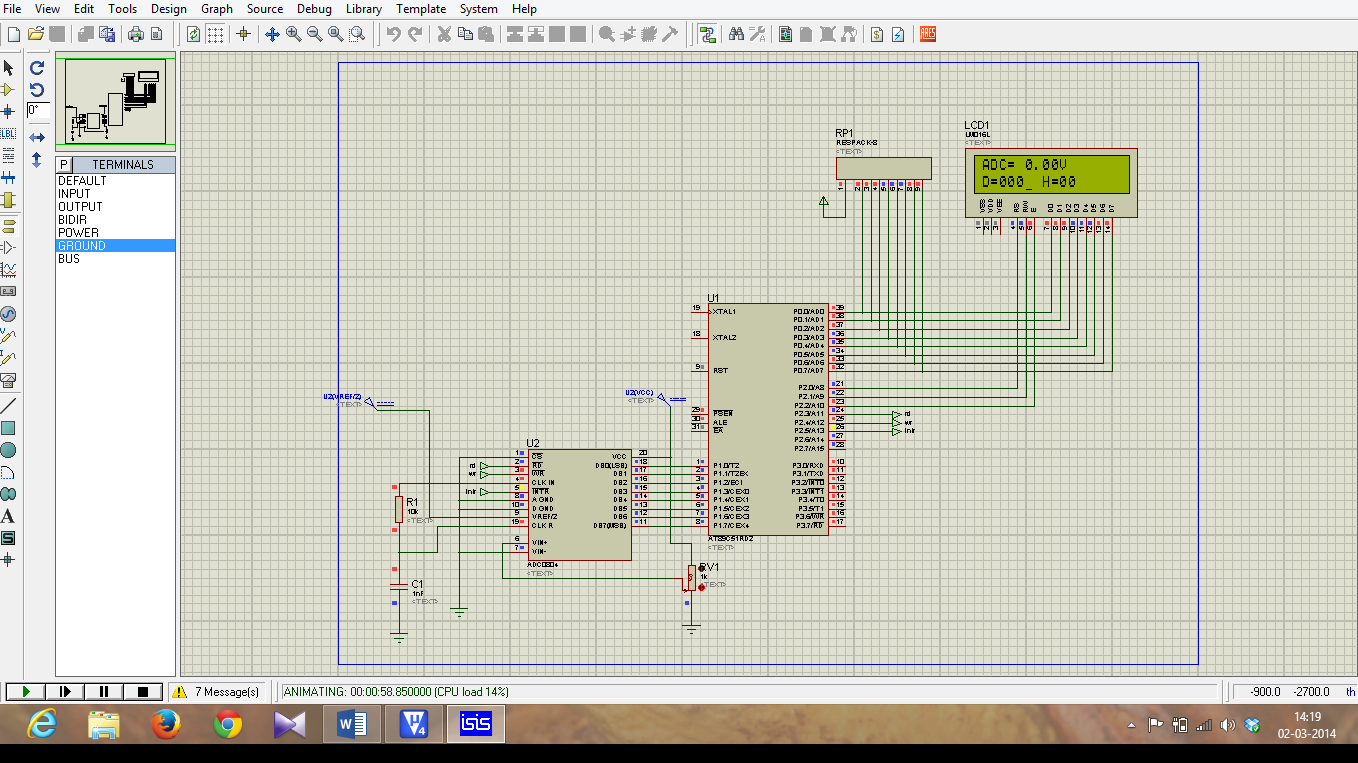
INTERFACING OF MICRO-CONTROLLER 8051 TO ADC (ADC 0804)

 INTERFACING OF MICRO-CONTROLLER 8051 TO ADC (ADC 0804)

Micro-controller 8051 does not has in-built ADC. So, we are using external ADC 0804. It is an 8-bit ADC so, resolution = 8-bit.

ADC 0804 Pin Details:


DB7 - DB0 – Are 8 Data Pin which hold Converted Digital data.

CS - It is an Active low signal usually we can ground it, or use a pin from microcontroller to control it by passing high to low pulse in the pin.

RD – It is an Active low signal it use to read data from ADC0804 Data line (DB7-DB0).

WR - It is an Active low signal. When low to high signal is passed in that pin the adc conversion start.

INTR - It is an Active low signal. It is used to Check for End of Conversion.

Vref/2 – It is the References voltage is given to ADC for Step sizes Calculation of conversion.

AGND – Analog Ground.


DGND – Digital Ground.

Important Note:

Resolution of this ADC is 8bit, so that means the Steps ranges from (0-255)

Formula:
            Step sizes = Vref/(2n -1);              n = 8(Resolution of ADC).
                            = Vref/(256 - 1);
                                   =  Vref/255;  


  • To convert and display the data into LCD we use a formula to convert it to ascii.

                                      if data = 125  
     for unit place data the formula is

  •         (data%10) = 5 => now or with 30h we get ascii value i.e.( 5|0x30 ) = 35

                               35 in ascii means 5 numeric.

     for tenth place data the formula is

  •          ((data/10)%10) = 2 => now or with 30h we get ascii value i.e.( 2|0x30 ) = 32

                               32 in ascii means 2 numeric.

     for send data the formula is

  •        ((data/100)%10) = 1 => now or with 30h we get ascii value i.e.( 1|0x30 ) = 31

                               31 in ascii means 1 numeric.

  • To convert the data into LCD in Hex format using lookup table
  •  first Mask the low bits using 0xF0 and shift higher 4bit data to lower 4 bit and        get the equal data from lookup table.
  •  then, mask the Higher bits using 0x0F and compare it with lookup table and          display it.

                 Ex:
              Higher bits = (data & 0xF0)>>4;
              Lower bits = (data & 0x0F);


  • To Convert the Digital data to analog we have formula ie;

                       
                        Dout = Vin/step sizes;
                        So, when we alter it we get
                        Vin = Dout * Step size;
                        Vin = Dout * (Vref/2n-1);

Apply this formula we get input voltage;

Thus we have done the Coding for Interfacing of ADC to 8051. 


Program for ADC:click for code

Video on above Example: Click for videos

Sunday, February 16, 2014

SIMPLE INTERFACE STEPPER MOTOR TO 8051

SIMPLE INTERFACE STEPPER MOTOR TO 8051

In this Program we have interface Stepper motor to 8051. Stepper motor is Driven by L293D IC.

L293D IC need Vss = +12V and Vs = +5V and en1 and en2 are used to enable Push-Pull Driver.
In this method we have used A unipolar Stepper motor.
  • A unipolar stepper motor has one winding with centre tap per phase. Each section of windings is switched on for each direction of magnetic field. 


  • Since in this arrangement a magnetic pole can be reversed without switching the direction of current, the commutation circuit can be made very simple (e.g., a single transistor) for each winding. 
  • Typically, given a phase, the centre tap of each winding is made common: giving three leads per phase and six leads for a typical two phase motor. Often, these two phase commons are internally joined, so the motor has only five leads. 


  • A micro controller or stepper motor controller can be used to activate the drive transistors in the right order, and this ease of operation makes unipolar motors popular with hobbyists; they are probably the cheapest way to get precise angular movements.


It Work According to the Table given below:
 
A
B
C
D
De
1
0
0
0
45
1
1
0
0
90
0
1
0
0
135
0
1
1
0
180
0
0
1
0
225
0
0
1
1
270
0
0
0
1
315
1
0
0
1
360 or
0
A = in1
B = in2
C = in3
D = in4
De = Degree of rotation


FOR PROGRAM REFER LINK:Click on this link for code

For videos on above example : click on this link

Saturday, February 15, 2014

SIMPLE INTERFACING OF DC MOTOR TO 8051

SIMPLE INTERFACING OF DC MOTOR TO 8051
  • In this method we are using a Motor driver IC (L293D). It is Driver which provide supply to motor (up to 12V) and prevent the microcontroller from motor Back EMF problem.
  • In our program we are using 3 pin of L293D that are en1, in1 and in2 for driving a motor. We must give a supply of 6V or 12V to Vss pin and 5V to Vs pin.
  • In1 and in2 are two pin which control the clockwise direction of motor.


  • En1 pin enable in1 and in2 or enable one side of IC’s Bridge, because it has two bridge which are control by en1 and en2.
  • En1 control in1 and in2, En2 control in3 and in4 pin of IC.
  • So we have assigned the Pin of Port0 i.e. P0.0 = in1, P0.1 = in2,P0.2 = en1.
  • So to enable the circuit en1 must always be 1 or (high).
  • And for Clockwise in1 = 1 and in2 = 0.

  • For Counter-Clockwise in1= 0 and in2 = 1.


  • So here is program for DC motor.


//--------------------------------------------------------------------------------------------------------//
#include<reg51f.h>

sbit in1 = P0^0;     //----Assigning Pin0 of PORT 0 as input 1 for motor
sbit in2 = P0^1;     //----Assigning Pin1 of PORT 0 as input 2 for motor
sbit en1 = P0^2;    //----Assigning Pin2 of PORT 0 as input 3 for enabling the driver IC
//--------Main Program-----------//
void main()
{
P0 = 0x00;           //----Assigning Port 0 as Output
en1 = 1;               //----Driver IC is enabled
while(1)               //----Creating Super loop
{
//-----To rotate motor in clockwise direction----//
in1 = 1;               //----Input 1 given as high
in2 = 0;               //----Input 2 given as low
}                        //----End of Super loop
}

//---------End of main program--------//
//---------------------------------------------------------------------------------------------------------//
Program:click for code

For video on above example:Click for video


Saturday, February 8, 2014

DISPLAYING CUSTOMIZED CHARACTER USING CGROM IN LCD DISPLAY LM016L


DISPLAYING CUSTOMIZED CHARACTER USING CGROM IN LCD DISPLAY LM016L

CGROM – Character Generator ROM
In LCD display we have seen that, when we send ASCII value it directly display.
Actually the CGROM has all ASCII value store in it. So when we send any ASCII value it compare it with CGROM and displays it.
A user defined Character Patterns can also be generated using mask-programmed ROM.
To Generate a Customized Character like Symbol, smiley etc.
We use 5x8 dot matrix to generate a symbol.


Don’t Care
    5 COLUMN
Hex value

R
O
W
0
0
0
0
X
X
X
0
0x0E
0
0
0
X
X
X
X
X
0x1F
0
0
0
X
0
0
0
X
0x11
0
0
0
X
0
0
0
X
0x11
0
0
0
X
0
0
0
X
0x11
0
0
0
X
0
0
0
X
0x11
0
0
0
X
X
X
X
X
0x1F
0
0
0
X
X
X
X
X
0x1F


X= 1;
0 = 0;


Higher 3-bit are don’t care because the data send is 8bit
So we use addition 3-bits a predefined 0 and rest of 5 bit are the 5 columns and 8 row are used to defined each row and column in the display.
X indicates that the bit is 1.
0 indicates the bit as 0.


In 5x8 matrix only the higher 3 bit are don’t care.


The symbol Created is a Battery symbol. We can generator many type of symbol using mask-programmed ROM (CGROM location that are unused)

The Hex value created for symbol must be place in CGROM location 40H.
The 40H memory has 8 addressable location from 00 to 07.


And while displaying we should mention addressable location of 40H that are storing 8-byte data in each location from 0x00 to 0x07.

Each location i.e. 0x00 hold 8-byte data. 

Any Queries Do Comment...

For videos on the above example: click on the link